Chapter 18: Utilities



This chapter describes the use of several utility programs;
calc,
lpr_ps,
ps_merge, and
editor.
calc:
Calc is a programming and scientific RPN calculator with binary (2), decimal
(10), octal (7), and hexadecimal (16) base support. It is shown in Figure 18.1. The
calculator is composed of several components, 1) a display log where the current entry
and previous operations and results are shown, 2) the four calculator registers (Top, Z,
Y, X respectively) and register shift keys, 3) the calculator angle mode (Degrees or
Radians), 4) the operation base (binary, octal, decimal, or hexadecimal), and 5) the
numerical and operation keypad.
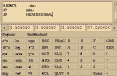 Figure 18.1
Numerical and Operation Keypad:
Unlike most calculators, the numerical keypad has legal values between 0-9 and
A-F. This allows for hexadecimal entries. Note though that only the appropriate keys
will be available based on the current base (e.g. in decimal the A-F keys will be
disabled). There are also many standard scientific functions. The available functions
are:
- CHS : Change sign of current number entry. If in exponential mode, changes
exponents sign.
EEX : Enter exponent for current entry.
+ : Add Y + X
- : Subtract Y - X
/ : Divide Y / X
* : Multiply Y * X
e^x : Raise e (2.71828) to the X power
ln : Natural log of X
10^x : Raise 10 to the X power
log : Log (Base 10) of X
cos : Cosine X
acos : Arc-cosine X
sin : Sine S
asin : Arc-sine X
tan : Tangent X
atan : Arc-tangent X
sqrt : Square root of X
x^2 : X squared
y^x : Raise Y to the X power
1/x :
x! : Take the factorial of X (X is first truncated to the nearest integer)
PI : Enter  (3.1415926...)
deg : Trigonometric functions will expect and return values in degrees.
rad : Trigonometric functions will expect and return values in radians.
DEC : Set Base 10 (floating point)
BIN : Set Base 2 (binary)
OCT : Set Base 7 (octal)
HEX : Set Base 16 (hexadecimal)
FRAC : Return fractional portion of X (e.g. 2.345 = 0.345)
INT : Truncate to lower integer (e.g. 12.974 = 12)
CLX : Clear X register (current entry)
CLR : Clear all registers (t, Z, Y, and X)
CLA : Clear all registers and clear log display window
STO : Store X register to buffer (0-9)
RCL : Recall buffer 0-9
Enter : Enter current entry.
Quit : Terminate program.
0-9, A-F, . : Used to enter desired number
- NOTE: Floating point (Decimal) arithmetic is only calculated in base 10
(Decimal). Operations in other bases will be truncated to the next lowest
integer value.
When X or Y is specified, it refers to the contents in the appropriate calculator register.
[TOP]
lpr_ps:
lpr_ps is a program for printing text files to a Postscript printer. The program
adds utility over the standard UNIX lpr command in that various print controls can be
specified:
- Font size.
- File name on header.
- Page number.
- Date and time stamp on header.
- Ability to print only specified lines of file.
- Ability to number lines.
- Landscape or portrait page orientation.
- NOTE: This is not a X-windows/motif application. This program is run from the
UNIX command line. This program though is called from several UNCERT
modules to print ASCII text files.
The output uses a Courier font. Courier was selected because it is a standard font
available on most computers and it is non-proportionally spaced (i.e. all letters are the
same width, therefore letters in a given column will always be vertically aligned. For
proportionally spaced fonts this is not true).
To run the application, the command line syntax is:
Syntax:
- lpr_ps
[-bm #.#]
[-fl #]
[-hd #.#]
[-hf #]
[-ll #]
[-lm #.#]
[-ln #]
[-lpc #]
[-lpq " "]
[-ln]
[-out " "]
[-rm #.#]
[-sd #]
[-tb #]
[-tf #]
[-tm #.#] filename
Meaning of flag symbols:
- # = integer
#.# = float
" " = character string.
NOTES:
- 1). All parameters in [] brackets are optional.
2). Quotes must be used around character strings.
3). Filename must be listed last.
Flag Definitions:
-
| -bm | = |
bottom margin | default = 1.0 |
| -fl | = |
first line to print | default = 1 |
| -hd | = |
distance of header from top margin | default = 0.5 |
| -hf | = |
header font size (1 point = 1/72") | default = 12 |
| -ll | = |
last line to print | default = last line |
| -ln | = |
print line numbers (if flag present) | |
| -lm | = |
left margin | default = 1.0 |
| -lpc | = |
number of copies | default = 1 |
| -lpq | = |
print queue | default = "ps" |
| -ls | = |
print orientation | default = 0 |
| |
0
1 |
=
= |
Portrait
Landscape |
|
| -out | = |
output file | default = "" |
| -rm | = |
right margin | default = 1.0 |
| -sd | = |
show date and time | default = 1 |
| |
|
| -tb | = |
spaces per tab | default = 8 |
| -tf | = |
text font point size (1 point = 1/72") | default = 7 |
| -tm | = |
top margin | default = 1.0 |
NOTE: If no filename is given, the above list of parameters is scrolled to the console.
An example command line argument might be:
- lpr_ps -fl 25 -ll 125 -ln -sd 1 -tf 8 lpr_ps.c
This would print 101 lines from the file "lpr_ps.c" starting at line 25 with line numbers.
The filename, page number, and date and time would be printed at the top of each
page. The font would be Courier 8 point.
[TOP]
ps_merge:
Ps_merge is a utility program used to merge and scale two UNCERT Postscript
files into a single Postscript file. Previously merged files may also be merged again with
raw Postscript files or other previously merged files. So that the graphics from one
figure don't overlap with that of another figure, each Postscript file can be
independently translated and scaled. Note that the translation is done before the
scaling.
- WARNING: This program cannot be used to merge Postscript files generated using
any programs other then those included in UNCERT.
Syntax:
- ps_merge
[-sx1 #.#]
[-sy1 #.#]
[-sx2 #.#]
[-sy2 #.#]
[-tx1 #.#]
[-ty1 #.#]
[-tx2 #.#]
[-ty2 #.#] file_1 file_2
Meaning of flag symbols:
# = integer
#.# = float
" " = character string.
NOTES:
- 1). All parameters in [] brackets are optional.
2). Quotes must be used around character strings.
3). Filename must be listed last.
If no entry is required for flag, flag command executed.
Flag Definitions:
-
| -sx1 | = |
X-Scale factor for file #1 | default = 1.0 |
| -sy1 | = |
Y-Scale factor for file #1 | default = 1.0 |
| -sx2 | = |
X-Scale factor for file #2 | default = 1.0 |
| -sy2 | = |
Y-Scale factor for file #2 | default = 1.0 |
| -tx1 | = |
X-Translation factor for file #1 (in 1/72") | default = 0 |
| -ty1 | = |
Y-Translation factor for file #1 (in 1/72") | default = 0 |
| -tx2 | = |
X-Translation factor for file #2 (in 1/72") | default = 0 |
| -ty2 | = |
Y-Translation factor for file #2 (in 1/72") | default = 0 |
NOTE: Translation performed before scaling.
An example command might be:
- ps_merge conc.ps geo.ps > combined.ps
Note that standard output is redirected to new new file.
[TOP]
editor:
Supplied with UNCERT is a simple text editor (Figure 18.2, A modified version of
the example editor in Motif Programming Manual (Volume 6) by Heller (1991)). Editor is
supplied mainly as a X/motif based tool to view text data and program result files. It is
not recommended that it be used for anything other then for the most basic file editing.
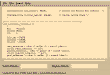 Figure 18.2
To run the application, the command line syntax is:
Syntax:
- editor [filename]
[TOP]
Table of Contents
Previous Chapter
Beginning of this Chapter
Appendix A