


The vario application is used for calculating one- and two-dimensional
experimental semivariograms. The package is not limited to just the classical
semivariogram but will also calculate covariances, madograms, rodograms, cross-
semivariograms, etc. Analysis of the calculated values through jackknifing is also an
option. Three types of soft indicator data can be used with hard data to calculate the
spatial continuity. The application displays the measure of covariance ( (h)) versus lag.
The vario application is composed of three sections (Figure 8.1); the main menu- bar, the status and log text area, and the drawing or graph area. The menu-bar is used to select all vario commands, the log/status area is used by the program to report important messages or results, and the drawing area is the display area for the graphs.
The data from the calculation will be saved in a *.gam file. This file is ready to be used as input to the Variofit application. Simple editing of the header in this file allows it to be viewed in the Plotgraph application.
If "vario.prf" does not exist in the current directory, it is created. This is an ASCII file and can be edited by the user. See Appendix C for details.
To enter soft data information, two dialogs are used. The first is created by the Experimental:Soft Data menu option and is shown in Figure 8.3. The second (Figure 8.4) is generated by pressing the Data Options button on the Experimental:Soft Data dialog (Figure 8.3). All soft data calculations are based on an indicator transform of the data. It is necessary to enter the number of indicator classes prior to making any soft data calculations. For both type A and type C soft data, it is necessary to open a file which contains necessary information on the soft data (See the "Setting Up the Input Data File" section).
The Uncertainty File Select button will display a listing of files in the directory similar to that shown in the original file open command under the File dialog (Figure 5.2). The uncertainty files generally have the suffix *.unc.
The Type A Data Flag and Threshold Number fields describe locations within the *.unc file. The Type A Data Flag is an index which defines the level of soft data being used. The Threshold Number is the threshold level (1 is lowest, n is highest) which is being calculated.
Type A soft data calculations can be weighted in several different ways. Each type A soft data calculation is a linear combination of the covariance calculated from the hard data, the hard-soft cross-covariance and the soft data auto-covariance. Each portion of the calculation is weighted separately and the three weights add up to one. Straight Pair Weighting weights the gamma calculation towards the most numerous type of data within the lag. Generally, soft data outnumber hard data and this type of weighting will favor the soft information. p1-p2 Scaled Pair Weighting takes into account the quality, as well as the quantity, of the soft information when calculating the weights. If the imprecision level of the soft data is high, the scaled weighting option is perhaps more prudent. The equations used to calculate the weights are discussed in the Vario math section.
The Data Options dialog (Figure 8.4) allows the user to set the column numbers for the soft data parameters. These parameters are the lower bound column for the data value, the upper bound column for the data value and the soft data index column. Type A soft data have the lower and upper bounds set equal to each other as do hard data. The uncertainty file which was opened above, contains the indicator thresholds and the misclassification probabilities p1 and p2. Type B and C soft data (interval and prior pdf) have unequal upper and lower bounds. For type B soft data these bounds define the interval in which the actual data value is believed to lie. For type C data, the lower and upper bounds define an interval within which the prior probability is defined at every indicator threshold. The previously opened uncertainty file contains the indicator thresholds and the prior probabilities at each threshold. Summary information on the soft data is displayed.
It is possible to display each component of the spatial measure by clicking on one of the Soft Data Print Options. The default option is the combined calculation.
The user is allowed two choices as to where the first lag should be calculated. Depressing the First Lag = 1/2 Lag Distance button will make the first calculation from all pairs of points within the distance 0.0 to 1/2 the lag distance value. If the First Lag = 1/2 Lag Distance button is not depressed, the first lag will be calculated from 0.0 to the lag distance value. If the Z-dimension is to be used in the calculation, the Activate Z Dimension button must be depressed. To define the search parameters for each spatial equation, define the number of models/directions desired then press the Define Directions button. This will create the dialog shown if Figure 8.7.
From the search directions dialog, the lag distance, maximum search distance, direction bandwidth, plunge bandwidth, horizontal and vertical search directions, and horizontal and vertical half-angles can be defined. The Plot toggle is used to turn on and off plotting for each line. The graph can get very busy and it can become difficult to determine which line is associated with each model/direction otherwise. The search directions, half angles and bandwidths are shown schematically in Figure 8.8.
To define the search parameters for each spatial equation, define the number of models/directions desired then press the Define Directions button. This will create the dialog shown if Figure 8.10.
From the search directions dialog, the search direction and lag spacing is defined by specifying the X, Y, and Z step size (These are integer values in units of rows, columns, and layers). The maximum lag, is specified by defining the maximum number of steps. The Plot toggle is used to turn on and off plotting for each line. The graph can get very busy and it can become difficult to determine which line is associated with each model/direction otherwise.
Eleven different measures of spatial continuity are available (Figure 8.11). The standard Semivariogram is the default method. For the Semivariogram, General Relative Semivariogram Pairwise Relative Semivariogram, Semivariogram of logarithms, Semirodogram, Semimadogram, and Indicator Semivariogram spatial equations the head (or value) data column in the Experimental:Hard Data dialog (Figure 8.2) must be defined. For the Cross-Semivariogram, Covariance, Correlogram, and Soft Indicator Covariance spatial equations the head and tail variables must be defined. For the Indicator Semivariogram and the Soft Indicator Covariance spatial equations, the minimum and maximum indicator cutoffs must be defined (Figure 8.5, discussed below). For the Soft Indicator Covariance spatial equation, the parameters in the Experimental:Soft Data dialogs must be defined.
The Calculate button calculates the specified spatial measure and plots the resulting values at the appropriate lag value.
When all the parameters are defined, press Calculate on this dialog. This calculation may take some time, so be patient. The calculation is basically computing eighteen experimental semivariogram models with a five degree half-angle. When the calculation is complete, the pop-up dialog shown in Figure 8.15 will be displayed.
Once the base calculation is complete, the data set can be evaluated using a limited number of half-angles (5o, 10o, 15o, ..., 75o, 85o, 90o. Bandwidths are not installed). This is because of how the base calculation was made, but these should be adequate for most purposes. Once a half-angle has been selected, press Calculate on THIS dialog. When calculated, eighteen experimental semivariograms will be displayed in the graph area (Figures 8.16a and 8.16b). This is a very busy way and not very useful way to examine the results. There are two other methods to view the results that are must more useful. The first step is to select a file name (a new data file is going to be created). The next step is to press the Grid or 3D Post button. If you press 3D Grid, the data set will be passed to the program block (Chapter 12), and you will see a display similar to Figure 8.17. In block you can tilt, rotate, and print the results (Refer to Chapter 12 for more details. If you press Grid, the data will be passed to grid (For details see Chapter 9). Once in grid, you can select the Method:Calculate menu option, then View:Contour Map. It will ask you if you want to save the results; say Save & Plot (This will save the results to a file called junk.srf). You will then see a plot similar to Figures 8.18a and 8.18b (See contour, Chapter 10 for more details).
These steps can quickly be done for each half-angle desired. Using this method, the principle anisotropy's (if present) can be quickly determined.
 values. Based on these values, a mean
and the variance and standard deviation can be calculated for each lag. By plotting
each value for each experimental semivariogram at each lag, and 95% confidence
error bars, much if the uncertainty of the semivariogram can be described (Figure 8.19).
values. Based on these values, a mean
and the variance and standard deviation can be calculated for each lag. By plotting
each value for each experimental semivariogram at each lag, and 95% confidence
error bars, much if the uncertainty of the semivariogram can be described (Figure 8.19).Once in the application, select the File:Open menu option. The pop-up dialog shown in Figure 5.2 will appear. Select the desired file. To open a file from the command line, enter at the UNIX prompt:
NOTE: if other command line arguments are used (See Running From the Command Line Section) the file name must be specified last. Also, if any command line arguments are used, you must specify a file name. For example:
will open the data file named "gs.water.dat", and
will open the same data file, but it will specify the bandwidth in the horizontal search direction to be 6.0. This file consists of GEO-EAS (See Setting up the Input Data File section) header and 659 data locations. The file has three columns: X, Y, Value. The values are all integers and range from 1 to 13. The vario package is called by typing "vario". Once the display appears on the screen the Experimental:Data dialog is brought up and edited. The X and Y columns are set to 1 and 2 respectively, the Z column is set to zero and the Value column is set to 3. Once this is done the file can be opened through the File:Open dialog as discussed previously.
The next step is to set the desired parameters which control the calculation of the spatial measure. The Experimental:Search Parameters:Point dialog is opened and modified. Press the Define Directions button. For this example, a lag distance of 0.25 units and the directional bandwidth is set to 6.0 units. The horizontal search direction is 0 degrees and the horizontal 1/2 angle is 90.0 degrees (an omni-directional calculation). Since this spatial measure is being calculated on a two dimensional data set, the plunge bandwidth, search direction and 1/2 angle are ignored in the calculation and can be left at the default values.
Next, a spatial measure is chosen by going to the Experimental:Spatial Equations dialog. For this example an indicator semivariogram was chosen and the upper threshold is set to 8.5. At this point, all that remains is to calculate the spatial measure (in this case, the indicator semivariogram). This can be done by clicking on the Experimental:Calculate button, or if the Experimental:Search Parameters:Points:Define Directions dialog remains on the screen the Calculate button at the bottom of this dialog can be used. Using the Calculate button in the Experimental:Search Parameters dialog, allows the user to adjust calculation parameters and recalculate the spatial measure without having to close the dialog. Results of the calculation of the indicator semivariogram are shown in Figure 8.25. The display parameters can be adjusted within the Border dialog.
Syntax:
NOTES:
If no entry is required for flag, flag command executed.
Flag Definitions:
| -3f | = | 2D experimental semivariogram filename | default = "junk.exp.dat" | |||
| -3haz | = | 2D half-angle | default = 0 | |||
|
||||||
| -3rx | = | 2D rotation around X-axis | default = 0.0 | |||
| -3rx | = | 2D rotation around Y-axis | default = 0.0 | |||
| -3rx | = | 2D rotation around Z-axis | default = 0.0 | |||
| -calct | = | calculation type | default = 0 | |||
|
||||||
| -ct | = | head variable column | default = 4 | |||
| -ct | = | tail variable column | default = 4 | |||
| -dip {} | = | dip (plunge) angle | default = 0.0 | |||
| -dir {} | = | search direction | default = 0.0 | |||
| -dsd | = | data set dimension (activate z dimen.) | default = 1 | |||
|
||||||
| -esp | = | exageration scale priority | default = 0 | |||
|
||||||
| -fl | = | first lag setting | default = 0 | |||
|
||||||
| -fnt1 | = | main title font | default = Helvetica-Bold | |||
| -fnt2 | = | secondary title font | default = Helvetica-Bold | |||
| -fnt3 | = | axes label font | default = Helvetica | |||
| -fnt4 | = | division font | default = Helvetica | |||
| -fnt5 | = | annotation font | default = Helvetica | |||
| -fnt6 | = | mouse position font | default = Helvetica | |||
| -fnts1 | = | main title font size | default = 24.0 | |||
| -fnts2 | = | main title font size | default = 15.0 | |||
| -fnts3 | = | main title font size | default = 15.0 | |||
| -fnts4 | = | main title font size | default = 12.0 | |||
| -fnts5 | = | main title font size | default = 10.0 | |||
| -fnts6 | = | main title font size | default = 12.0 | |||
| -gml | = | grided data: maximum lags | default = 10 | |||
| -gnd | = | number of grid search directions | default = 1 | |||
| -gxi | = | grided data X step increment | default = 1 | |||
| -gyi | = | grided data Y step increment | default = 1 | |||
| -gzi | = | grided data Z step increment | default = 1 | |||
| -hbw {} | = | horizontal bandwidth | default = 1/2th max diag | |||
| -help | = | give this help menu | ||||
| -hi | = | high indicator cutoff | default = data max. | |||
| -hw {} | = | horizontal 1/2 angle | default = 90.0 | |||
| -il | = | soft indicator index level | default = 1 | |||
| -ind | = | irregualr number of search directions | default = 1 | |||
| -jack | = | run, jackknife, and calcualte vario without X-interface | ||||
| -jcl | = | jackknife error-bar/band confidence level | default = 90.0% | |||
| -jebd | = | plot jackknife error-bands (lag variance) | default = 1 | |||
|
||||||
| -jebr | = | plot jackknife error-barss (g(h) variance) | default = 1 | |||
|
||||||
| -jev | = | plot jackknife error variance bars | default = 1 | |||
|
||||||
| -jir | = | plot intermediate jackknife results | default = 1 | |||
|
||||||
| -jjr | = | plot full unjackknifed semivariogram | default = 1 | |||
|
||||||
| -jrp | = | jackknife number of points removed | default = 1 | |||
| -jrpc | = | jackknife percentage of points removed | default = 10% | |||
| -jrt | = | jackknife point removal protocall | default = 0 | |||
|
||||||
| -lag {} | = | lag spacing | default = 1/10th max diag | |||
| -lbc | = | lower bound column (soft data) | default = 4 | |||
| -lc {} | = | line color | default = variable | |||
|
||||||
| -lgf | = | log file name | defalut = "log.dat" | |||
| -lgpp | = | legend parameter position | default = 1 | |||
|
||||||
| -lgpa | = | legend model displayed | defalut = 1 | |||
| ||||||
| -li | = | low indicator cutoff | default = data min. | |||
| -lpbm | = | page bottom margin | default = 1.5 | |||
| -lpc | = | number of copies to print | default = 1 | |||
| -lpd | = | print destination | default = 0 | |||
|
||||||
| -lpf | = | print filename | default = "junk.ps" | |||
| -lph | = | print header page | default = 0 | |||
|
||||||
| -lplm | = | page left margin | default = 1.5 | |||
| -lpo | = | print orientation | default = 0 | |||
|
||||||
| -lppsext | = | search extention for postscript files | default = "*.ps" | |||
| -lpq | = | print queue | default = "ps" | |||
| -lpr | = | print file at specified orientations | ||||
| -lprm | = | page right margin | default = 1.0 | |||
| -lps | = | print output | default = 0 | |||
|
||||||
| -lptm | = | page top margin | default = 1.5 | |||
| -lsfl {} | = | fill line symbol | default = 0 | |||
|
||||||
| -lsc {} | = | line symbol color | default = variable | |||
|
||||||
| -lssz {} | = | line synbol size | default = 9.0 | |||
| -lsty {} | = | line symbol type | default = 0 | |||
|
||||||
| -ltk {} | = | line thickness | default = 1.0 | |||
| -lty {} | = | line type | default = 0 | |||
|
||||||
| -md | = | dash mesh | default = 0 | |||
|
||||||
| -mg {} | = | mag lag | default = max diagonal | |||
| -mox | = | X mesh origin | default = 0.0 | |||
| -moy | = | Y mesh origin | default = 0.0 | |||
| -ms | = | use mesh | default = 0 | |||
|
||||||
| -mx | = | X mesh frequency | default = 1/10 DX | |||
| -my | = | Y mesh frequency | default = 1/10 DY | |||
| -nsi | = | number of soft indicators | default = 8 | |||
| -out | = | output *.gam filename | defalut = "junk.gam" | |||
| -prf | = | preference file name | defalut = "vario.prf" | |||
| -rfh | = | screen refresh | default = 0 | |||
|
||||||
| -run | = | run and calcualte vario without X-interface | ||||
| -set | = | spatial equation type | default = 0 | |||
|
||||||
| -sfa | = | soft flag A type data | default = 2 | |||
| -sic | = | soft index column | default = 6 | |||
| -sp | = | plot as semivariogram | default = 1 | |||
|
||||||
| -spo | = | soft print option | default = 0 | |||
|
||||||
| -sttl | = | Secondary title | default = " " | |||
| -swo | = | soft weighting option | default = 0 | |||
|
||||||
| -ttl | = | Main title | default = Filename | |||
| -ubc | = | upper bound column (soft data) | default = 5 | |||
| -unf | = | soft data uncertainty definition file | default = Undefined | |||
| -vbw {} | = | vertical band width | default = 1/50th max lag | |||
| -vw {} | = | vertical 1/2 angle | default = 90.0 | |||
| -xc | = | X data input column | default = 1 | |||
| -xfmt | = | Number of decimal places for X-axis | default = ".2f" | |||
| -xlabel | = | X-axis label | default = "X" | |||
| -xmax | = | Graph X-maximum | default = Data Maximum | |||
| -xmin | = | Graph X-minimum | default = Data Minimum | |||
| -xMt | = | X main tic frequency | default = 1/10 DX | |||
| -xmt | = | Number of minor X tics | default = 5 | |||
| -xto | = | X axis label origin | default = 0.0 | |||
| -xy | = | xy ratio | default = 1.5 | |||
| -yc | = | Y data input column | default = 2 | |||
| -yfmt | = | Number of decimal places for X-axis | default = ".2f" | |||
| -ylabel | = | X-axis label | default = "Y" | |||
| -ymax | = | Graph Y-maximum | default = Data Maximum | |||
| -ymin | = | Graph Y-minimum | default = Data Minimum | |||
| -yMt | = | X main tic frequency | default = 1/10 DY | |||
| -ymt | = | Number of minor Y tics | default = 5 | |||
| -ys | = | Y-axis exageration relative to X-axis | default = Calculated | |||
| -yto | = | X axis label origin | default = 0.0 | |||
| -zc | = | Z data input column | default = 3 |
The basic file consists of columns of data. The vario package will read in up to 10 columns in the data file. The number of rows of data is limited only by machine memory. This type of data file requires no header lines. Once inside the program, the columns denoting the X and/or Y and/or Z coordinates as well as the column containing the data values are specified within the I dialog. If a soft data calculation is to be done, the columns containing the upper bound, lower bound and the soft data index are defined in the soft data dialog by touching the data options button and filling in the dialog.
The second data format that vario will read is the "GEO-EAS" format. This is described in Chapter 5.
The following section explains the format for soft data entry. Table 8.1 displays the input format for hard data, the three types of soft data and locations in the domain where there are no conditioning data. In the case of a hard data conditioning value, the coordinates of the well are given and the class to which the attribute belongs is both the upper and lower bound of an interval. Making the upper and lower bounds of the interval equal denotes that there is negligible error in assigning this measure of the attribute to class 3.
| X | Y | Z | Index | Bound 1 | Bound2 | Comments |
|---|---|---|---|---|---|---|
| 23 27 39 55 44 |
104 279 340 412 85 |
1 1 1 1 1 |
1 2 1 -2 -1 |
3 4 3 2 1 |
3 4 5 4 5 |
Hard Data Soft Data A Soft Data B Soft Data C No Conditioning Data |
Table 8.1: Format for input data files. X, Y, and Z are coordinates.
Type A soft data are entered in a manner similar to hard data in that a single value is assigned to both ends of the interval. However, there is uncertainty in assigning this location to class 4. As was seen in the discussion above, this uncertainty is quantified by the values p1 and p2. In the case of type A data, the index value is a flag telling the simulation software where the values of p1 and p2 for each threshold are located. This index corresponds to the index in the uncertainty file. These values of p1 and p2 will be entered in the uncertainty file as shown above. If p1 and p2 do not vary spatially, every location conditioned with Type A soft data will have the same index. If p1 and p2 do vary spatially, different locations will be characterized by different values of p1 and p2 and each set of p1 and p2 values will have a different index. The index numbers can range from 2 to infinity.
Type B soft data are entered with the lower and upper bounds of the interval. Through some technique, it is possible to determine that the location has a class value of 3, 4 or 5.
Type C soft data are entered in a manner similar to those of type B. The bounds define an interval, but in the case of type C data the shape of the distribution between the interval bounds is known. The index, from -2 to -infinity, is a flag telling the simulation software where to locate the distribution within the uncertainty file that belongs within the interval bounds for this location.
Uninformed locations are given the maximum bounds of the observed data. For example, at each location in the domain where there is no well, nor any soft data measurement, the simulated class must be within the extremes of the classes observed throughout the site. Assigning the uninformed locations to be within the maximum and minimum values observed during the site investigation relies on the assumption that the maximum and minimum of the attribute within the domain have been sampled. This may not be the case, and it may be reasonable to set the bounds on the uninformed locations to define a greater interval than the observed interval.
		2  1
		2
		0.876   0.123
		0.921   0.147
		0.806   0.095
		3
		0.798   0.078
		0.932   0.134
		0.902   0.201
		-2
		0.145
		0.433
		0.780
The first line contains the number of sets of soft data type A (imprecise data) calibration sets and the number of type C (prior probability) soft data cumulative probability distributions. For this example file, there are two type A data sets and 1 type C prior cdf. The second line contains the index for the first set of type A calibration probabilities. Type A indices are equal to or greater than 2. In this example file there are three indicator thresholds and the next three lines hold the p1 and p2 values for each threshold. Lines 6 through 10 are the index and p1 and p2 values for the second set of type A calibration. Line 11 holds the index for the only type C prior cdf. Type C indices are equal to or less than -2. The last three lines of this example file are the values of the prior cdf at each of the indicator thresholds.
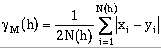
N(h) is the number of pairs of data points. xi is the value at the start or "tail" of the pair and yi is the variable at the end or "head" of the pair (Figure 8.26). Calculations with the semivariogram should be limited to cases where the head and tail refer to the same variable (attribute). For different variables, the cross-semivariogram should be employed.
zi and zi' are the tail and head values of attribute z respectively. Similarly, yi and yi' are the tail and head values of the second attribute. The head and tail for both attributes are separated by the vector h.
The means of the head and tail variables are denoted by m+h and m-h respectively and are calculated as:
where
If x and y refer to different variables, the covariance calculation determines the cross- covariance. This calculation is used to determine the cross-covariance between hard and soft data.
where s-h and s+h refer to the standard deviation of the tail and head values respectively. The standard deviations are calculated by:
When x and y refer to two different variables, this calculation becomes the cross- correlogram.
Note: both the general relative and the pairwise relative semivariograms have been shown to be resistant to data sparsity and outliers when applied to positively skewed data sets. Because of the denominators in the calculations, the general and pairwise relative semivariograms should be used only with positive variables.
Note: rodograms and madograms are useful for determining the large scale spatial structure but should not be used for modeling the nugget value of spatial continuity.
Where cuti is the indicator threshold.
Hard data are values which are measured with no, or negligible, uncertainty (e.g., the shear strength of a soil sample as measured in a laboratory). Hard data are considered to be quantitative data and ideally, there will be a large amount of hard data collected during site investigations. Hard data will be denoted as z(x): the value of attribute z as measured at location x.
Soft data are data which contain nonnegligble uncertainty (Alabert, 1987). These
qualitative data will be written as  (x) : an estimate of the attribute z at location x.
Three categories of soft data are generally recognized. Type A soft data are values, or
value classes, assigned at a location based on an imprecise measurement or an expert
guess (e.g., lithologic facies based on a measurement of seismic velocity; estimates of
porosity and/or permeability from geophysical well logs; length of a channel sand
deposit based on an expert opinion). Type B soft data consist of recognized bounds, or
a single bound, on a value without information on the distribution of the value between
the upper and lower bounds (e.g., from previous exploration, an aquitard is believed to
be between 100m and 150m below the ground surface at a given location; by observing
a house which is still standing but suffered structural damage, an interval bounding
the seismic intensity of an earthquake at that location can be determined). Type C soft
data consist of a prior probability distribution on the variable of interest (e.g., it is
known from previous studies that the distribution of hydraulic conductivity values for a
sandstone aquifer is log-normal with a given mean and variance). Table 8.2
summarizes the three types of soft data. These three types of soft data are discussed
below in terms of Bayesian statistics.
(x) : an estimate of the attribute z at location x.
Three categories of soft data are generally recognized. Type A soft data are values, or
value classes, assigned at a location based on an imprecise measurement or an expert
guess (e.g., lithologic facies based on a measurement of seismic velocity; estimates of
porosity and/or permeability from geophysical well logs; length of a channel sand
deposit based on an expert opinion). Type B soft data consist of recognized bounds, or
a single bound, on a value without information on the distribution of the value between
the upper and lower bounds (e.g., from previous exploration, an aquitard is believed to
be between 100m and 150m below the ground surface at a given location; by observing
a house which is still standing but suffered structural damage, an interval bounding
the seismic intensity of an earthquake at that location can be determined). Type C soft
data consist of a prior probability distribution on the variable of interest (e.g., it is
known from previous studies that the distribution of hydraulic conductivity values for a
sandstone aquifer is log-normal with a given mean and variance). Table 8.2
summarizes the three types of soft data. These three types of soft data are discussed
below in terms of Bayesian statistics.
| TYPE OF DATA | FORMAT | UNCERTAINTY MEASURE | |||||||||||
|---|---|---|---|---|---|---|---|---|---|---|---|---|---|
| HARD DATA | single value z(x) | no uncertainty | |||||||||||
|
|
|
Table 8.2: Types of information (after Alabert, 1987).
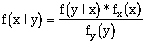
where A and B are discrete events. For continuous random variables X and Y, Bayes Theorem is expressed in terms of probability density functions (pdf's):
Where fx(x) and fy(y) are the marginal pdf's of random variables X and Y respectively, and f(x|y) is the pdf of random variable X given that Y = y and vice versa for f(y|x) (x and y are the specific values of X and Y in this instance) (Alabert, 1987).
For a random variable Z corresponding to an unknown attribute z at a given location, the prior marginal pdf on z is fz(z). This pdf is derived from any knowledge of the variable in the area and is a prior pdf as no experiment has yet been performed at this location to gain more knowledge of the attribute z. This pdf, fz(z), summarizes the uncertainty on z at this location. An experiment performed to gain knowledge of variable z at a given location will update the pdf on z:
f(z|e) is a posterior distribution, and it is a measure of the uncertainty on z after the experiment E. f(e|z) is a likelihood function-it measures the likelihood of the outcome of the experiment, e, given z and thus quantifies the informative quality of the experiment E (Alabert, 1987).
, is
independent of the actual value of the attribute, z, and the prior distribution fz(z) equals
the posterior distribution, f(z|e) - "the experiment did not improve the prior beliefs on z"
(Alabert, 1987, p.18).
In practice, the development of a reasonable likelihood function is difficult. In the best situations, both hard and soft data can be sampled in the same area and the quality of the experiment, or updating, can be assessed via calibration samples. Each calibration sample is a location where both hard and soft data measurements of the same attribute have been obtained. For example, if lithology is to be determined from seismic velocity measurements (soft data), the accuracy of this method can be determined by examining the results of the experiment (interpreting lithology from velocity) at locations where hard data are available (the wells). From the calibration samples, the probabilities of misclassifying the attribute via the soft data are determined. These probabilities are capable of fully characterizing the indicator likelihood function for each indicator cutoff, as will be discussed in the "Estimating the Z-cdf With Soft Data" section. This calibration is essential, otherwise it would be necessary to rely entirely on models of uncertainty which could be woefully inadequate. Alabert (1987) discusses several models that could be used as likelihood functions when it is impossible to quantify the precision of the experiment.
is independent of the actual value z (Alabert, 1987).
The range of the spatial attribute z(x) is discretized into Nc+1 classes described by Nc thresholds, or cutoffs, z1, z2, ... zNc. The indicator coding of the information does not call for a priori knowledge of prior and posterior distributions, hard and soft data are coded similarly.
| Cutoffs | Hard Data Datum | Type-A | Soft Data Type-B | Type-C |
|---|---|---|---|---|
|
ZNc . . . Z1 |
1.0 1.0 1.0 0.0 0.0 |
1.0 1.0 0.0 0.0 0.0 |
1.0 1.0 ? ? 0.0 |
1.0 0.8 0.5 0.2 0.2 |
Table 8.3: Indicator coding of hard and soft data (after Alabert, 1987).
As shown in Table 8.3, the type A soft data are encoded with a 0 or 1 at each discrete class. The resulting vector of 0's and 1's contains imprecise information. For example, each indicator "1" has a nonnegligble probability that the true corresponding indicator is actually a 0. Thus the imprecision of the type A indicators must be quantified. This quantification is determined by covariances between imprecise indicators and covariances between imprecise indicators and hard indicators. "Under some assumptions, those covariances are shown to be related to hard indicator covariances through a scaling factor which depends only on the misclassification probabilities": (Alabert, 1987, p. 31) p1 and p2.
where Z(x) is a binary function defined for a cutoff zc. The probabilities p1 and p2 are
easily estimated for each cutoff if calibration samples are available to determine the
precision of the experiment generating the soft data. If (x) is a good measure of z(x),
p1 approaches 1 and p2 approaches 0. If (x) contains no information of z(x), p1 = p2 =
P[(x) <= zc]. This method is essentially cokriging of hard and imprecise indicator data
to derive an estimation of spatial probabilities conditioned to hard and soft data
(Alabert, 1987).
The fact that p1 and p2 do not sum to 1.0 is a source of confusion. An examination of p1 and p2 in terms of statistical hypothesis testing is given in order to clarify the definitions of p1 and p2. The null hypothesis, Ho, is defined here to be the case of Z(x) <= zk (the actual datum ó the threshold). The possible cases corresponding to acceptance and rejection of the null hypothesis are given below:
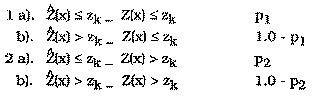
There are two cases where Ho is rejected and two cases where it is accepted:
| H0 is TRUE | H0 is FALSE | |
|---|---|---|
| Accept H0 | Correct Decision (case 1a) |
Type II Error (case 2a) |
| Reject H0 | Type I Error (case 1b) |
Correct Decision (case 2b) |
Alabert (1987) uses co-semivariograms, not semivariograms, to develop his theory of improving spatial estimation with soft data. Generally, the covariance can be obtained from the semivariogram by the relationship: C(h) = s2 - g(h). However, this relation has been shown to be valid only in cases where stationarity and ergodicity can be assumed. In most situations, the experimental covariance is a better estimate of the exhaustive covariance than the covariance derived from the semivariogram (Alabert, 1987, Issaks and Srivastava, 1988). All soft data covariance measures calculated with this software can be displayed as semivariograms using a relationship developed by Issaks and Srivastava which does not require implicit assumptions of ergodicity (1988):
Assuming the error on the soft indicators is stationary, p1 and p2 are independent of x and can be written p1(zc) and p2(zc). These probabilities fully characterize the indicator likelihood function at cutoff zc defined as:
Alabert (1987) makes the point that knowledge of the Nc indicator likelihood functions
is not equivalent to knowledge of the full likelihood function f(|z); however
determination of the full likelihood function is not practical, nor is it necessary to fully
account for the quality of the indicator information. Therefore, in practice, the
likelihood function is estimated through estimates of p1(zc) and p2(zc). A graphical
method of determining p1 and p2 is shown in Figure 8.28. The misclassification
probabilities are calculated from the equations at the top of the figure. Regions A and D
are inclusive of any points lying on the vertical Zc. Region A is also inclusive of any
values lying directly on the horizontal Zc. The case of Type A soft data without
calibration samples will not be discussed here.
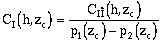
Two relations will be developed: the first is between hard indicator covariances and hard-soft indicator cross-covariances and the second is between hard indicator covariances and soft indicator covariances. Alabert (1987) derives a simple relationship between the hard indicator covariance CIî(h,zc) and the hard-soft indicator cross- covariance CI(h,zc). Assuming stationarity of I and î and that p1(zc) does not equal p2(zc):
An estimate of the hard indicator covariance can be derived from the hard-soft indicator covariance:
the subscript Nh refers to that portion of the estimate derived from the available hard indicators. Nh, Ns denotes the estimate derived from the experimental hard-soft indicator cross-covariance. The weight, w, can be adjusted to account for both the number of pairs involved in each covariance estimate, as well as, the quality of the soft indicators (Alabert, 1987).
The second case considers estimating the hard data covariance from the covariance between soft data locations. When considering two soft indicators at two different locations, î(x,zc) and î(y,zc), Alabert (1987) shows that the covariance between the two is a scaled version of the hard data covariance between them:
and assuming stationarity of I and î and rearranging:
Note that the quality of the soft information at both locations is taken into account. If one of the two soft data values provides no information on its corresponding hard attribute (p1(zc) approximately equals p2(zc)), then C (x,y,zc) = 0. This model will break down when the errors have a strong spatial correlation (Alabert, 1987). So, assuming stationarity of I and î and if p1(zc) does not equal p2(zc), CI(h,zc) can be estimated:
where Ns denotes the estimate of covariance derived from the experimental soft indicator covariance. The weights should again be chosen to reflect the quality of the soft data and the number of pairs involved in each of the experimental covariances. The three weights must sum to 1.0. The two weighting options within the software are described below.
The "Straight Pair Weighting Option" calculates the omega weights strictly by the quantity of hard and soft data pairs within the lag spacing.
Where Nh and Ns denote the number of hard data and soft data pairs within the lag spacing. Ntotal equals the total number of pairs within the lag spacing. The use of soft data to estimate the covariance, or semivariogram, allows the maximum number of pairs available for estimation to be Nh2 + Nh * Ns + Ns2 rather than just Nh2 if only hard data were available.
For a full theoretical development of these relationships the reader is referred to Alabert (1987). Alabert (1987) performed experimental checks for the relationships presented in this section and found that even small amounts of soft data can improve the estimation of the spatial correlation relative to using only hard data.
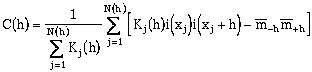
Kulkarni (1984) devised a semivariogram equation which took into account different weights of points at different locations.
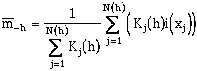
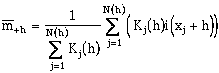
Where the quantity K is the weight of the data pair calculated as the product of the pcdf value for each point at the current indicator threshold. The number of pairs of data that make up the gamma calculation at each lag is no longer necessarily an integer value since it is the sum of the K weights. The previous equation can be written in terms of a covariance calculation:
where the head and tail means are given by:
To side step this problem, a process called jackknifing (cross-validation) is used
(Shafer and Varljen, 1990, and Davis, 1987). Jackknifing is a procedure where one (or
more) data points is removed from the data set, and then the experimental
semivariogram is calculated. By repeating this procedure for every point in the data
set, a series of n (n = number of samples) experimental semivariograms are calculated.
For each lag distance there are now n mean (h) values. From these values it is then
possible to approximately determine, for example, the 95% confidence limits for the
mean (h) value for a particular lag. When these are plotted, the error bars define the
possible range of the modeled semivariogram. There is a problem with this method.
Each mean value calculated is correlated with the other mean values calculated at that
lag (the same data, except for one point, is being used) therefore the variance
calculations are not strictly correct (Davis, 1987). As will be explained, this technique
is not being used to prove a particular semivariogram model is correct, which it cannot
do (Davis, 1987), but to guide the modeler in collecting further data or identifying a
likely range of reasonable model semivariograms.
Two other concepts should be considered when jackknifing. First, because data points are being removed from the data set to calculate the experimental semivariogram, the variance, and therefore the calculated sill will generally increase slightly. With more data the population is better defined, and the variance is lower. Secondly, when a single experimental semivariogram based on all the data is calculated, the results may appear to be easily modeled. The problem with a single experimental semivariogram is that it is difficult to determine if it represents the true nature of the site, or if the modeler was fortunate in selecting lags. By jackknifing the data the error-bars let the modeler determine how much confidence can be attributed to the modeled semivariogram.
Davis, B.M., 1987, Uses and Abuses of Cross-Validation in Geostatistics, Mathematical Geology, Vol. 19, No. 3, pp 241-248.
Deutsch, C.V. and A.G. Journel, 1992, GSLIB: Geostatistical Software Library and User's Guide, Oxford University Press, New York, 340 pp.
Englund, E. and A. Sparks, 1988, GEO-EAS, U.S. Environmental Protestion Agency, Environmental Monitoring Systems Laboratory, Las Vegas, Nevada, EPA/600/4- 88/033.
Isaaks, E., and R.M. Srivastava, 1988, Spatial Continuity Measures for Probabilistic and Deterministic Geostatistics, Mathematical Geology, Vol. 20, No. 4, pp. 313-341.
Journel, A., 1986, Constrained Interpolation and Qualitative Information, Mathematical Geology, Vol. 18, No. 3, pp. 269-286.
Shafer, J.M. and M.D. Varljen, 1990, Approximation of Confidence Limits on Sample Semivariograms From Single Realizations of Spatially Correlated Random Fields, Water Resources Research, Vol. 26, No. 8, pp 1787-1802.
 (8-1)
(8-1) (8-2)
(8-2) (8-3)
(8-3)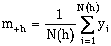 (8-4)
(8-4)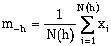 (8-5)
(8-5) (8-6)
(8-6) (8-7)
(8-7)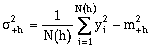 (8-8)
(8-8)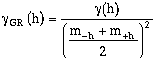 (8-9)
(8-9) (8-10)
 (8-11)
 (8-12)
 (8-13)
 (8-14)
 (8-15)
 (8-16)
 (8-17)
 (8-18)
 (8-19)
 (8-20)
 (8-21)
 (8-22)
 (8-23)
 (8-24)
 (8-25)
 (8-26)
 (8-27)
 (8-28)
 (8-29)
 (8-30)
 (8-31)
 (8-32)
 (8-33)
 (8-34)
 (8-35)